








Web Accessibility Standards: Designing, Developing and Testing Compliant Applications – Instructor-Led Live Training
Course code:
Web Accessibility Standards: Designing, Developing and Testing Compliant Applications – Instructor-Led Live Training - Dates and application
First training day: 26 October 2026 , Additional training days: 27., 28.


Please submit your enrolment and we shall endeavour to secure a place for you.
Applying for closed-group training
Enrolment without a date
In this training program, learners will acquire proficiency in how to design, develop and test websites usable by as many people as possible. During the training program, you will familiarise yourself with accessibility standards. You will receive theoretical knowledge and practical examples - of creating and testing different elements of a website to be accessible, focusing on level A of the Web Content of Accessibility Guideline (WCAG) criteria.
This program is mainly aimed at UX/UI designers, frontend developrs and software testers who want to dig deeper into accessibility standards and practices. The program is highly valuable for everyone working on projects where accessibility is a main concern.
No programmer or testing experience is required, you will learn the basics and what you need during the training program, but some basic web knowledge (HTML, CSS) is welcome.
 Website accessibility is a legal requirement.
The European Accessibility Act (EAA) is a directive that establishes a common set of rules. However, the EAA does not contain industry best practices for accessibility. It relies mainly on the Web Content Accessibility Guidelines (WCAG) as the main point of reference. The EAA is legally binding.
According to Title III of the Americans with Disabilities Act (ADA), all public areas must accommodate people with disabilities, including websites, mobile and desktop applications.
June 28, 2022, was the deadline for all the European Union member states to adopt the EAA into law.
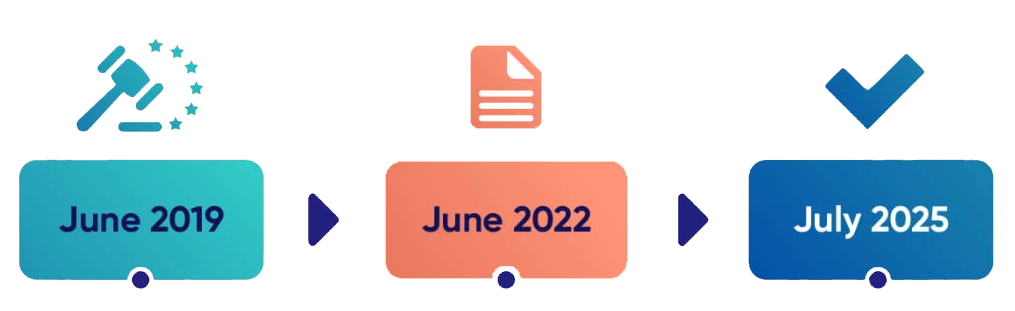
Companies have to comply with the European Accessibility Act by 28th June 2025. Right now, in 2023, this might look like the distant future, but based on how long it takes to develop an application, to change and adapt the design to be accessible, this time is actually short.
Looking back on the General Data Protection Regulation (GDPR), on 25th May 2018 companies were not prepared enough to have GDPR-compliant businesses. Based on the statistics, 80% of the companies were not compliant when the deadline arrived, and 27% had not even started taking steps.
Preparing for upcoming legal regulations and changes is always cheaper than reacting to them.
Detailed description and topics of the comprehensive program
During this comprehensive program, you will gain expertise in how to test an application from an accessibility point of view. The focus will be on getting to know the WCAG criteria and how to apply accessibility directives in practice. This comprehensive program covers level A criteria, which can give you an overview and an easy introduction to this standard. The comprehensive program also contains the usage of different tools that can be helpful during accessibility testing.
1. General Introduction to Accessibility
1.1. What is accessibility? Meeting accessibility in the everyday life
1.2. Categories of disabilities
1.3. Helpers, tools
1.4. Overview
2. Introduction to WCAG
2.1. Why do we need the WCAG?
2.2. History of the WCAG
2.3. Levels and structure
3. WCAG - Perceivable
3.1. Non-text Content (WCAG Chapter 1.1.1)
3.2. Audio-Only and Video-Ony (Prerecorded) (WCAG Chapter 1.2.1)
3.3. Captions (Prerecorded) (WCAG Chapter 1.2.2)
3.4. Audio Description or Media Alternative (Prerecorded) (WCAG Chapter 1.2.3)
3.5. Info and Relationships (WCAG Chapter 1.3.1)
3.6. Meaningful Sequence (WCAG Chapter 1.3.2)
3.7. Sensory Characteristics (WCAG Chapter 1.3.3)
3.8. Use of Colors (WCAG Chapter 1.4.1)
3.9. Audio Control (WCAG Chapter 1.4.2)
4. WCAG - Operable
4.1. Keyboard (WCAG Chapter 2.1.1)
4.2. No Keyboard Trap (WCAG Chapter 2.1.2)
4.3. Character Key Shortcuts (WCAG Chapter 2.1.4)
4.4. Timing Adjustable (WCAG Chapter 2.2.1)
4.5. Pause, Stop, Hide (WCAG Chapter 2.2.2)
4.6. Three Flashes or Below Threshold (WCAG Chapter 2.3.1)
4.7. Bypass Blocks (WCAG Chapter 2.4.1)
4.8. Page Titled (WCAG Chapter 2.4.2)
4.9. Focus Order (WCAG Chapter 2.4.3)
4.10. Link Purpose (in Context) (WCAG Chapter 2.4.4)
4.11. Pointer Gestures (WCAG Chapter 2.5.1)
4.12. Pointer Cancellation (WCAG Chapter 2.5.2)
4.13. Label in Name (WCAG Chapter 2.5.3)
4.14. Motion Actuation (WCAG Chapter 2.5.4)
5. WCAG - Understandable
5.1. Language of Page (WCAG Chapter 3.1.1)
5.2. On Focus (WCAG Chapter 3.2.1)
5.3. On Input (WCAG Chapter 3.2.2)
5.4. Error Identification (WCAG Chapter 3.3.1)
5.5. Labels or Instructions (WCAG Chapter 3.3.2)
6. WCAG - Robust
6.1. Parsing (WCAG Chapter 4.4.1)
6.2. Name, Role, Value (WCAG Chapter 4.1.2)
7. Final thoughts
7.1. Challenges in the Domain
7.2. Introduction to WCAG conformance levels AA and AAA
Instructors

Do you have any questions about the training?

Course Administrator

The whole training was well structured, with great examples, the instructor is excellent!
Attila Horváth
IT Services Hungary Kft.